
 English
 Lithuanian
 Latvian
 Русский

Charity Results
April 09, 2011
<img src="http://www.teamfortress.com/images/posts/charity_number.png" width="420" height="76" border="0">
Nice work, everyone! We're excited to share that, thanks to the generosity of the TF community, in two short weeks we managed to collect
$430,543.65 for the Japanese disaster relief fund. It's been inspiring to watch gamers around the world come together for such a worthy cause.
We'd also like to give a special thanks to the good folks over at the <a href="http://www.unusualhatclub.com/forums/">Unusual Hats Club</a> for taking it upon themselves to raise an additional $3,000 through their own Hats for Help campaign.
Thanks for taking part in our charity drive, everyone! Wear your hats with pride!
Nice work, everyone! We're excited to share that, thanks to the generosity of the TF community, in two short weeks we managed to collect
$430,543.65 for the Japanese disaster relief fund. It's been inspiring to watch gamers around the world come together for such a worthy cause.
We'd also like to give a special thanks to the good folks over at the <a href="http://www.unusualhatclub.com/forums/">Unusual Hats Club</a> for taking it upon themselves to raise an additional $3,000 through their own Hats for Help campaign.
Thanks for taking part in our charity drive, everyone! Wear your hats with pride!
Charity Results
April 09, 2011

Nice work, everyone! We're excited to share that, thanks to the generosity of the TF community, in two short weeks we managed to collect
$430,543.65 for the Japanese disaster relief fund. It's been inspiring to watch gamers around the world come together for such a worthy cause.
We'd also like to give a special thanks to the good folks over at the Unusual Hats Club for taking it upon themselves to raise an additional $3,000 through their own Hats for Help campaign.
Thanks for taking part in our charity drive, everyone! Wear your hats with pride!
This is Very Good Title to Blog Post
April 08, 2011
<img src="http://www.teamfortress.com/images/posts/soldier_engy.png" width="420" height="234" border="0">
Um. Hello. Is this on? Excuse please. This is first time making blog post. For babies. I am sorry. Before I sell you something, I am supposed to flatter you. So: not baby. You are all not babies. There. Done. Yes?
No? Oh kay.
Usually Soldier has baby job of talking to you through button board. He cannot come to blog today because he tells me he must accept highest honor US government can give: Jury Duty. He could not wait to go deliver his guilty hanging verdict for whatever it is criminal did, but he left seventeen page speech for me to type to you. I am not doing this.
Anyway, hats. They are new and very good for you. There are ten of them. One is bear, not hat. So nine hats and bear. Available through drops, craftings and store. Is good deal, you should buy. Moneys go to TF community members who make hats and bears. Do not wait. Get in line now for hat or bear. Have money ready because line is going to be long.
These are good words. Job is done. Where is Heavy's hat?
What?
I SAID, WHERE IS HEAVY'S HAT?
Um. Hello. Is this on? Excuse please. This is first time making blog post. For babies. I am sorry. Before I sell you something, I am supposed to flatter you. So: not baby. You are all not babies. There. Done. Yes?
No? Oh kay.
Usually Soldier has baby job of talking to you through button board. He cannot come to blog today because he tells me he must accept highest honor US government can give: Jury Duty. He could not wait to go deliver his guilty hanging verdict for whatever it is criminal did, but he left seventeen page speech for me to type to you. I am not doing this.
Anyway, hats. They are new and very good for you. There are ten of them. One is bear, not hat. So nine hats and bear. Available through drops, craftings and store. Is good deal, you should buy. Moneys go to TF community members who make hats and bears. Do not wait. Get in line now for hat or bear. Have money ready because line is going to be long.
These are good words. Job is done. Where is Heavy's hat?
What?
I SAID, WHERE IS HEAVY'S HAT?
This is Very Good Title to Blog Post
April 08, 2011
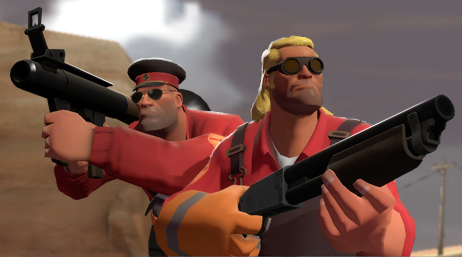
Um. Hello. Is this on? Excuse please. This is first time making blog post. For babies. I am sorry. Before I sell you something, I am supposed to flatter you. So: not baby. You are all not babies. There. Done. Yes?
No? Oh kay.
Usually Soldier has baby job of talking to you through button board. He cannot come to blog today because he tells me he must accept highest honor US government can give: Jury Duty. He could not wait to go deliver his guilty hanging verdict for whatever it is criminal did, but he left seventeen page speech for me to type to you. I am not doing this.
Anyway, hats. They are new and very good for you. There are ten of them. One is bear, not hat. So nine hats and bear. Available through drops, craftings and store. Is good deal, you should buy. Moneys go to TF community members who make hats and bears. Do not wait. Get in line now for hat or bear. Have money ready because line is going to be long.
These are good words. Job is done. Where is Heavy's hat?
What?
I SAID, WHERE IS HEAVY'S HAT?
Team Fortress 2 Update Released
April 08, 2011
Updates to Team Fortress 2 have been released. The updates will be applied automatically when your Steam client is restarted. The major changes include:
Team Fortress 2
Team Fortress 2
- Ended the Japan charity drive
- Added 9 new hats and 1 new bear
How does this blog thing work again?
April 06, 2011
Here's an update of some happenings in the TF2 community:
<iframe title="YouTube video player" width="420" height="266" src="http://www.youtube.com/embed/S24TsiwsE7M?rel=0" frameborder="0" allowfullscreen></iframe><ul><li>ChemicalAlia has been working on a <a href="http://www.youtube.com/watch?v=S24TsiwsE7M">female counterpart</a> to the Spy</a>.</li>
<li><a href="http://www.ganggarrison.com/">Gang Garrison</a> just launched a new <a href="http://www.ganggarrison.com/classy/">classy update</a> with all sorts of new and improved features.</li>
<li><a href="http://etf2l.org/">ETF2L</a> finals for the <a href="http://etf2l.org/matches/24655/">European Highlander Challenge Cup</a> has been completed! SNSD clinched top spot against Colony.</li>
<li><a href="http://eurothunder.kritzkast.com/">Pubbers vs Pros</a> has also concluded with the pubbers grabbing the win against the pros.</li>
<li>Replays of both the Highlander Challenge and Pubbers vs Pros mentioned tournaments are <a href="http://www.tf2tv.com/watch-again/">available here</a> complete with commentary.</li>
<li>Turkeydoesnotwantplz made this <a href="http://turkeydoesnotwantplz.deviantart.com/art/My-Weapon-196102168">sweet minigun</a> to tromp around his neighborhood with. Looks like he needs a couple more sandviches though.</li>
<li><a href="http://www.tf2tv.com/we-are-live/">TF2TV</a> is holding a <a href="http://www.tf2tv.com/contest/tf2tv-presents-the-art-of-war/">competition</a> for people to create a TF2TV themed poster or wallpaper. Details on their page.</li></ul>
<iframe title="YouTube video player" width="420" height="266" src="http://www.youtube.com/embed/S24TsiwsE7M?rel=0" frameborder="0" allowfullscreen></iframe><ul><li>ChemicalAlia has been working on a <a href="http://www.youtube.com/watch?v=S24TsiwsE7M">female counterpart</a> to the Spy</a>.</li>
<li><a href="http://www.ganggarrison.com/">Gang Garrison</a> just launched a new <a href="http://www.ganggarrison.com/classy/">classy update</a> with all sorts of new and improved features.</li>
<li><a href="http://etf2l.org/">ETF2L</a> finals for the <a href="http://etf2l.org/matches/24655/">European Highlander Challenge Cup</a> has been completed! SNSD clinched top spot against Colony.</li>
<li><a href="http://eurothunder.kritzkast.com/">Pubbers vs Pros</a> has also concluded with the pubbers grabbing the win against the pros.</li>
<li>Replays of both the Highlander Challenge and Pubbers vs Pros mentioned tournaments are <a href="http://www.tf2tv.com/watch-again/">available here</a> complete with commentary.</li>
<li>Turkeydoesnotwantplz made this <a href="http://turkeydoesnotwantplz.deviantart.com/art/My-Weapon-196102168">sweet minigun</a> to tromp around his neighborhood with. Looks like he needs a couple more sandviches though.</li>
<li><a href="http://www.tf2tv.com/we-are-live/">TF2TV</a> is holding a <a href="http://www.tf2tv.com/contest/tf2tv-presents-the-art-of-war/">competition</a> for people to create a TF2TV themed poster or wallpaper. Details on their page.</li></ul>
How does this blog thing work again?
April 06, 2011
Here's an update of some happenings in the TF2 community:
<iframe title="YouTube video player" width="420" height="266" src="http://www.youtube.com/embed/S24TsiwsE7M?rel=0" frameborder="0" allowfullscreen></iframe>
<iframe title="YouTube video player" width="420" height="266" src="http://www.youtube.com/embed/S24TsiwsE7M?rel=0" frameborder="0" allowfullscreen></iframe>
- ChemicalAlia has been working on a female counterpart to the Spy.
- Gang Garrison just launched a new classy update with all sorts of new and improved features.
- ETF2L finals for the European Highlander Challenge Cup has been completed! SNSD clinched top spot against Colony.
- Pubbers vs Pros has also concluded with the pubbers grabbing the win against the pros.
- Replays of both the Highlander Challenge and Pubbers vs Pros mentioned tournaments are available here complete with commentary.
- Turkeydoesnotwantplz made this sweet minigun to tromp around his neighborhood with. Looks like he needs a couple more sandviches though.
- TF2TV is holding a competition for people to create a TF2TV themed poster or wallpaper. Details on their page.
Hats For Help
March 30, 2011
Wow. Seriously, people, WOW. We knew you had it in you, but we're still amazed you've raised over $300,000 so far.
Take a BOW, TF2 community -- because that is an incredible, frankly astounding, amount of money from a dedicated number of gamers, to one heck of a lot of people in some real need right now. Anytime someone gives you guff about something negative in gaming, you go ahead and point them to this post, because here's some late-breaking damn news: they are wrong and gamers are generous and awesome.
Thanks again, and don't forget, these items are available until April 6.
Take a BOW, TF2 community -- because that is an incredible, frankly astounding, amount of money from a dedicated number of gamers, to one heck of a lot of people in some real need right now. Anytime someone gives you guff about something negative in gaming, you go ahead and point them to this post, because here's some late-breaking damn news: they are wrong and gamers are generous and awesome.
Thanks again, and don't forget, these items are available until April 6.
Hats For Help
March 30, 2011
Wow. Seriously, people, WOW. We knew you had it in you, but we're still amazed you've raised over $300,000 so far.
Take a BOW, TF2 community -- because that is an incredible, frankly astounding, amount of money from a dedicated number of gamers, to one heck of a lot of people in some real need right now. Anytime someone gives you guff about something negative in gaming, you go ahead and point them to this post, because here's some late-breaking damn news: they are wrong and gamers are generous and awesome.
Thanks again, and don't forget, these items are available until April 6.
Take a BOW, TF2 community -- because that is an incredible, frankly astounding, amount of money from a dedicated number of gamers, to one heck of a lot of people in some real need right now. Anytime someone gives you guff about something negative in gaming, you go ahead and point them to this post, because here's some late-breaking damn news: they are wrong and gamers are generous and awesome.
Thanks again, and don't forget, these items are available until April 6.